
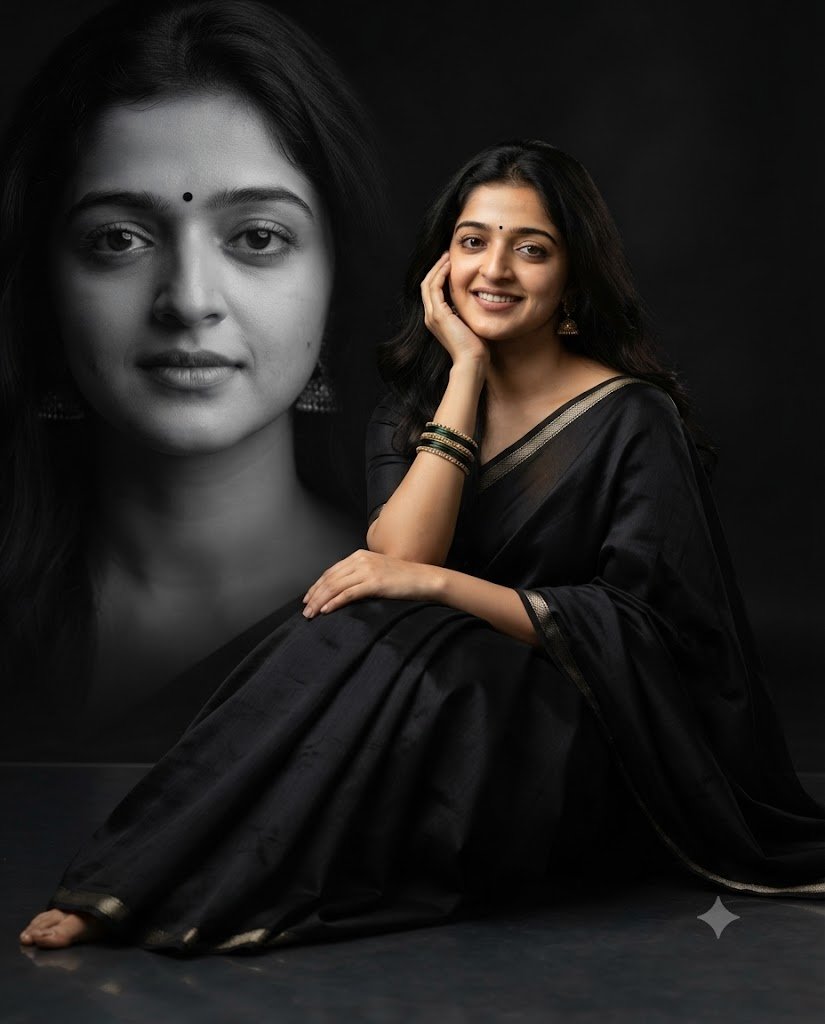
✨ Black Saree Double Exposure Portrait
PROMPT
Create a photorealistic studio portrait of an elegant woman seated gracefully on the smooth dark floor, wearing a luxurious black saree with a matching black blouse.
She has naturally long, softly styled hair, a small black bindi, traditional jhumka earrings, and stacked green-and-gold bangles. She rests one hand gently against her cheek while the other rests naturally on her knee, with a warm, natural smile and natural posture.
Composition: full-body seated portrait, subject positioned slightly right of center, with a large monochrome close-up head-and-shoulder portrait of the same woman softly blended into the background on the left, with calm expression, creating a sophisticated double-exposure editorial effect.
Background: deep black seamless studio backdrop with subtle gradients and cinematic depth.
Lighting: soft diffused key light on the subject, gentle rim lighting, controlled shadows, dramatic high-contrast monochrome background.
Camera angle: eye-level, slightly elevated perspective.
85mm lens, shallow depth of field, cinematic color grading, ultra-detailed skin and fabric texture, realistic hands and anatomy, photorealistic, 8K resolution, premium fashion editorial photography, vertical composition, aspect ratio 4:5.
No text, no watermark, no distortion, no anatomy error.
✓ Prompt copied successfully!
Black Saree Double Exposure AI Prompt क्या है?
इस AI Prompt की मदद से आप अपनी फोटो को एक शानदार Black Saree Double Exposure Portrait में बदल सकते हैं। इसमें काली साड़ी, traditional jewellery, cinematic studio lighting और background में आपकी बड़ी monochrome portrait दिखाई देगी।
यह फोटो कहाँ बना सकते हैं?
इस Prompt को ऐसे AI Image Generator में इस्तेमाल किया जा सकता है जो reference image/photo upload और text prompt दोनों support करता हो।
आपको बस:
- अपनी साफ और अच्छी quality वाली फोटो तैयार रखें।
- AI Image Generator खोलें।
- अपनी reference photo upload करें।
- नीचे दिया गया AI Prompt copy करें।
- Prompt को AI tool में paste करें।
- Generate / Create बटन दबाएं।
- AI आपकी फोटो के आधार पर नया portrait तैयार करेगा।
फोटो कैसी होनी चाहिए?
बेहतर परिणाम के लिए ऐसी फोटो इस्तेमाल करें जिसमें:
- चेहरा साफ दिखाई दे।
- फोटो धुंधली न हो।
- चेहरा बहुत ज्यादा angle पर न हो।
- पर्याप्त रोशनी हो।
- चेहरे पर कोई बड़ा object न हो।
- High-quality फोटो इस्तेमाल करें।