
AI IMAGE PROMPT
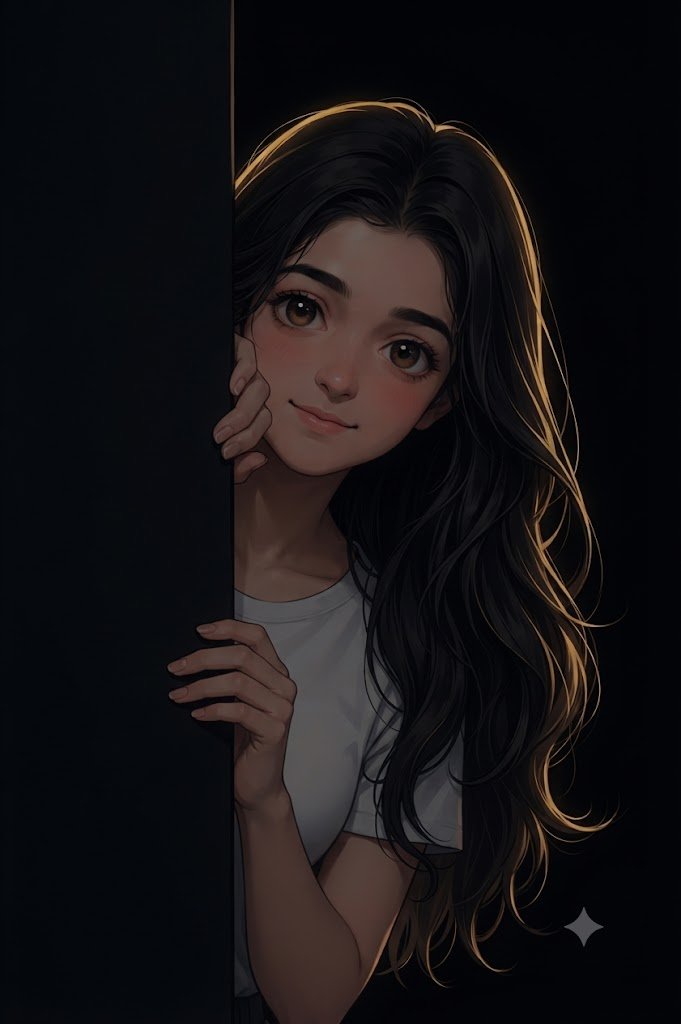
Create a cinematic anime-style digital artwork of an uploaded young woman peeking from behind a black wall, with only half of her face and body visible.
She has long hair with warm golden rim lighting, big expressive eyes, soft blush on her cheeks, and a cute, charming expression. Her hands gently hold the edge of the wall, creating a natural and playful pose.
Deep black background, dramatic studio lighting, high contrast, ultra-detailed hair strands, smooth skin, fantasy poster composition, dark aesthetic, realistic anime render, 4K quality.
Cinematic composition, detailed facial features, expressive eyes, natural hands and fingers, realistic lighting, premium digital artwork, sharp focus, sophisticated dark atmosphere.
Preserve the recognizable facial characteristics of the uploaded reference image while transforming the overall appearance into a high-quality anime-style render.
No text, no watermark, no facial distortion, no deformed hands, no extra fingers, no anatomy errors, no blurry face, no low-quality details.
✓ Prompt सफलतापूर्वक Copy हो गया!
यह AI Photo कहाँ बनाएं?
नीचे दिए गए AI Image Generator में आप अपनी फोटो Upload करके इस AI Prompt का इस्तेमाल कर सकते हैं। अपने पसंद के tool को खोलें, फोटो Upload करें, Prompt Paste करें और Image Generate करें।
1. ChatGPT Image Generator
फोटो Upload करें और Prompt के साथ नई Image बनाएं।
2. Google Gemini
Reference Photo Upload करके Prompt के साथ Image Generate करें।
3. Microsoft Designer
AI Prompt का इस्तेमाल करके creative images बनाएं।
4. Adobe Firefly
Text Prompt की मदद से AI Images तैयार करें।
5. Leonardo AI
Creative और detailed AI artwork बनाने के लिए Prompt इस्तेमाल करें।
6. Ideogram
AI Prompt से अलग-अलग तरह की creative images बनाएं।
💡 कैसे इस्तेमाल करें:
अपनी फोटो Upload करें → Prompt Copy करें → Prompt Paste करें →
Generate पर क्लिक करें।