
Pink Saree Rabbit AI Photo Prompt से फोटो कैसे बनाएं?
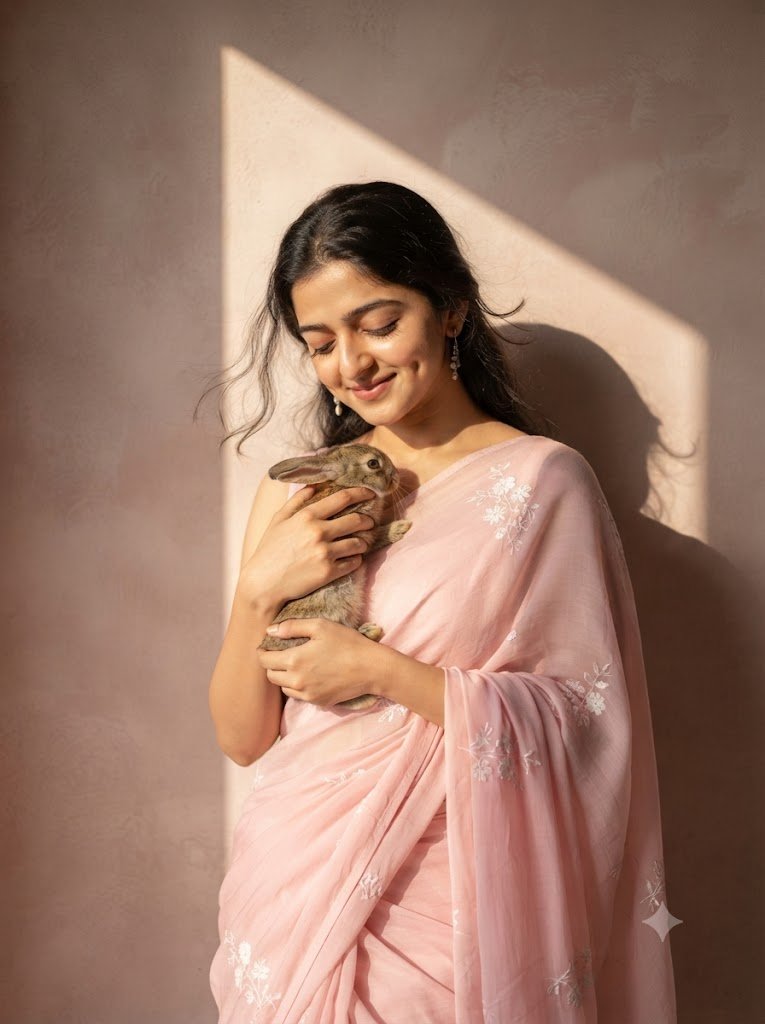
Pink Saree Rabbit AI Photo Prompt की मदद से आप अपनी फोटो को एक खूबसूरत, realistic और cinematic portrait में बदल सकते हैं। इस AI image prompt में महिला को soft pink saree में दिखाया गया है, जिसमें delicate white floral embroidery है। महिला अपने हाथों में एक छोटे rabbit को प्यार से पकड़े हुए है और warm natural sunlight पूरे portrait को एक soft और emotional look देती है।
इस prompt की खासियत यह है कि इसमें uploaded reference photo के चेहरे की पहचान, facial structure और natural features को बनाए रखने पर विशेष ध्यान दिया गया है। साथ ही textured wall, sunlight और subject की natural shadow portrait को ज्यादा realistic और professional बनाती है।
Pink Saree Rabbit AI Photo कैसे बनाएं?
इस AI photo को बनाने के लिए आपको अपनी एक clear reference photo और एक compatible AI Image Generator की जरूरत होगी। नीचे दिए गए आसान steps को follow करके आप अपनी इसी तरह की AI photo बना सकते हैं।
- सबसे पहले अपनी एक clear और अच्छी quality वाली photo upload करें।
- ऊपर दिया गया Pink Saree Rabbit AI Photo Prompt copy करें।
- नीचे दिए गए किसी भी AI Image Generator को खोलें।
- अपनी reference photo upload करें और prompt को paste करें।
- Image generate करने का option चुनें।
- बेहतर result के लिए clear face वाली reference image का इस्तेमाल करें।
AI Image बनाने के लिए कौन-से Generator इस्तेमाल करें?
नीचे दिए गए popular AI Image Generators में आप अपने prompt का इस्तेमाल करके अलग-अलग तरह की AI photos बना सकते हैं। कुछ platforms text-to-image के साथ image editing या image-to-image features भी देते हैं।
ChatGPT Images
AI image generate और existing photo edit करने के लिए।
Google Gemini
Google Gemini में AI image generation और image editing features का इस्तेमाल करें।
Microsoft Designer
Prompt से AI images बनाएं और images को edit करें।
Adobe Firefly
Text prompt से realistic और creative AI images generate करें।
Leonardo AI
Text-to-image और image-to-image AI generation के लिए।
Ideogram
Creative AI image generation और visual designs के लिए।
इस AI Image Prompt में क्या खास है?
यह prompt simple portrait को एक cinematic और emotional AI photo में बदलने के लिए तैयार किया गया है। इसमें photography, lighting और composition की details को काफी स्पष्ट तरीके से बताया गया है।
- Soft Pink Saree: महिला को elegant soft pink saree में दिखाया गया है।
- White Floral Embroidery: Saree पर delicate white floral embroidery दी गई है।
- Rabbit: महिला अपने हाथों में छोटे rabbit को affection के साथ पकड़े हुए है।
- Natural Sunlight: एक तरफ से warm sunlight portrait को natural glow देती है।
- Realistic Shadows: Wall पर subject और rabbit की crisp shadows दिखाई देती हैं।
- Natural Skin: Skin texture को natural रखने के लिए beauty smoothing से बचने को कहा गया है।
- 85mm Lens: Portrait photography जैसा professional depth effect दिया गया है।
- Shallow Depth of Field: Face और rabbit पर sharp focus के साथ background को softly blurred रखा गया है।
- Golden-Hour Mood: Warm sunlight image को peaceful और romantic atmosphere देती है।
- 3:4 Aspect Ratio: Portrait को vertical 3:4 format में बनाया गया है।
बेहतर AI Photo बनाने के लिए Tips
- Reference photo में चेहरा साफ और अच्छी lighting में होना चाहिए।
- बहुत ज्यादा blurry या low-quality photo का इस्तेमाल न करें।
- Face पर sunglasses या बड़े accessories वाली photo से बचें।
- AI generator में reference image को सही तरीके से upload करें।
- अगर result में face बदल रहा है तो prompt में identity preservation instructions को बनाए रखें।
- Natural और realistic result के लिए excessive filters का इस्तेमाल न करें।
यह AI Photo Prompt किसके लिए उपयोगी है?
यह AI Saree Photo Prompt उन लोगों के लिए उपयोगी है जो अपनी photo को traditional, elegant और cinematic style में generate करना चाहते हैं। इसका इस्तेमाल social media profile photos, Instagram posts, Pinterest images, creative portraits और AI photography experiments के लिए किया जा सकता है।
क्या अपनी फोटो से यह AI Image बनाई जा सकती है?
हाँ, अगर आपका इस्तेमाल किया गया AI Image Generator reference image support करता है, तो आप अपनी photo upload करके इस prompt का इस्तेमाल कर सकते हैं। बेहतर facial consistency के लिए clear और front-facing reference photo का इस्तेमाल करना उपयोगी रहता है।
क्या Saree का रंग बदला जा सकता है?
हाँ। आप prompt में soft pink saree की जगह red, blue, green, yellow, white या किसी अन्य रंग का इस्तेमाल कर सकते हैं। इसी तरह floral embroidery का design भी अपनी पसंद के अनुसार बदला जा सकता है।
क्या Rabbit की जगह कोई दूसरा Pet इस्तेमाल कर सकते हैं?
हाँ। आप rabbit की जगह cat, puppy या किसी अन्य suitable pet का इस्तेमाल कर सकते हैं। इसके लिए prompt में rabbit से संबंधित description को अपने पसंदीदा pet के अनुसार बदलना होगा।
Pink Saree Rabbit AI Photo Prompt के लिए Image SEO
इस AI generated image को अपनी website पर publish करते समय image का file name, ALT text और title भी descriptive रखना चाहिए।
- Image File Name: pink-saree-rabbit-ai-photo-prompt.webp
- Image Alt Text: Pink Saree Rabbit AI Photo Prompt से बनाई गई realistic portrait
- Image Title: Pink Saree Rabbit AI Photo Prompt
- Image Format: WebP
- Aspect Ratio: 3:4
Related AI Image Prompt Keywords
Pink Saree AI Photo Prompt, Rabbit AI Photo Prompt, AI Saree Photo Prompt, AI Photo Prompt, Realistic AI Portrait Prompt, Woman Saree AI Photo, AI Image Generator Prompt, Photorealistic AI Photo Prompt, Cinematic AI Photo, Traditional Saree AI Photo, Realistic Saree Portrait