
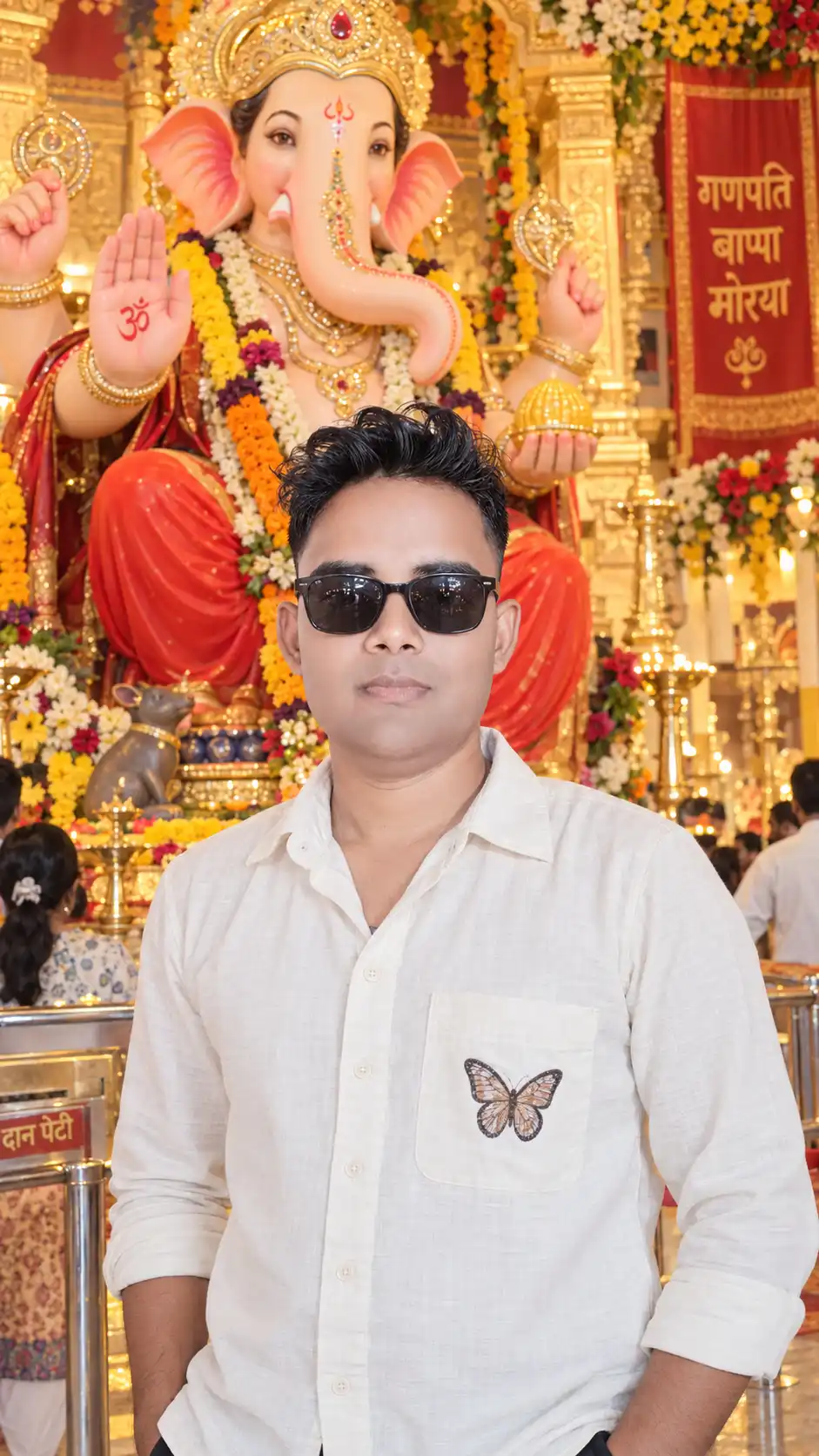
Ganesh Chaturthi Temple Portrait
Ganesh Chaturthi ke special occasion par Lord Ganesha ke saath ek beautiful, realistic aur cinematic portrait banana chahte hain? Yeh Ganesh Chaturthi AI photo prompt aapki reference photo ko use karke ek premium devotional portrait create karne ke liye designed hai.
Is prompt mein person ki natural appearance, pose, clothing, hairstyle, composition aur overall look ko reference image ke close rakhne par focus kiya gaya hai. Saath hi background ko beautifully decorated Ganesh Chaturthi temple environment mein transform karne ke liye detailed instructions di gayi hain.
How to Use This Ganesh Chaturthi AI Photo Prompt
Is AI image prompt ka use karna simple hai. Aapko sirf apni reference image upload karni hai aur upar diya gaya prompt copy karke compatible AI image generator ya image editing tool mein use karna hai.
- Apni clear reference photo upload karein.
- Copy Prompt button par click karein.
- AI image generation ya editing tool open karein.
- Reference image ko image input ke roop mein add karein.
- Copied prompt ko prompt box mein paste karein.
- Image generate karein aur zarurat ke according result refine karein.
Create a Realistic Ganesh Chaturthi Portrait
Simple text prompt ki comparison mein detailed prompt AI ko subject, environment, lighting, camera perspective aur overall mood ko better understand karne mein help kar sakta hai.
Is prompt mein realistic facial appearance, natural body proportions, black sunglasses, curly hairstyle, light cream shirt, butterfly pocket patch aur rolled-up sleeves jaise visual details ko describe kiya gaya hai.
Background mein beautifully decorated Lord Ganesha idol, golden ornaments, flower garlands, traditional temple decorations aur warm festive lighting create karne ke instructions bhi included hain.
Important Features of This AI Photo Prompt
- ✓ Reference image based portrait
- ✓ Natural-looking person and facial proportions
- ✓ Ganesh Chaturthi temple environment
- ✓ Beautifully decorated Lord Ganesha idol
- ✓ Traditional golden ornaments and flower garlands
- ✓ Warm devotional temple lighting
- ✓ DSLR photography aesthetic
- ✓ 50mm lens and f/2.8 photography look
- ✓ Shallow depth of field
- ✓ Soft cinematic bokeh
- ✓ Realistic skin and fabric textures
- ✓ Photorealistic premium editorial style
Use a Clear Reference Photo
Reference image ki quality AI-generated result par kaafi effect kar sakti hai. Isliye aisi image choose karein jisme face reasonably clear ho aur lighting bahut zyada dark ya overexposed na ho.
Agar aap reference-image based creative workflow use karna chahte hain, to Adobe ke image-generation aur image-to-image tools bhi explore kar sakte hain.
Explore Adobe Firefly Image-to-Image
Make the Ganesha Idol Look Natural
AI-generated religious images mein kabhi-kabhi hands, ornaments, jewelry ya decorative elements inconsistent ho sakte hain. Isliye final image ko carefully check karna important hai.
Generation ke baad in details ko specially inspect karein:
- Ganesha idol ke hands aur traditional elements
- Ganesha ji ka face aur trunk
- Golden ornaments aur jewelry
- Flower garlands
- Om symbol aur decorative details
- Person ke hands aur fingers
- Sunglasses aur hairstyle
- Shirt aur butterfly pocket patch
- Lighting aur shadows
Cinematic Temple Photography Look
Is prompt mein 50mm lens, f/2.8 aperture, shallow depth of field, soft bokeh aur cinematic color grading jaise photography terms ka use kiya gaya hai. In details ka purpose AI ko ek professional photography aesthetic ke baare mein clear visual direction dena hai.
Warm golden lighting Ganesha idol ke ornaments ko naturally highlight karti hai, jabki shallow depth of field background ko softly blur karke main subject aur idol ko visual focus mein rakhti hai.
Aap Adobe Firefly ke official image-generation resources se bhi AI image prompting aur image creation ke baare mein explore kar sakte hain.
Learn More About Adobe Firefly
Canva AI Se Bhi Try Kar Sakte Hain
Agar aap AI-generated image ko design, social media post ya festive creative mein use karna chahte hain, Canva ke AI tools bhi explore kiye ja sakte hain. Available AI features account aur plan ke according different ho sakte hain.
Tips for Better Ganesh Chaturthi AI Photos
Face aur clothing clearly visible hone wali high-quality image use karein.
Original photo mein heavy beauty filters ya extreme effects avoid karein.
Final generated image mein fingers aur hands ko zaroor inspect karein.
Agar first generation perfect na ho, to specific details ko refine karke dobara generate karein.
Frequently Asked Questions
Can I use my own photo with this Ganesh Chaturthi prompt?
Haan. Yeh prompt reference-image workflow ke liye designed hai. Aap apni clear photo upload karke is prompt ko use kar sakte hain.
Can I create a realistic Ganesha temple background?
Haan. Prompt mein decorated temple, Lord Ganesha idol, flower garlands, golden ornaments aur warm devotional lighting ki detailed instructions di gayi hain.
Can I use this prompt with Adobe Firefly?
Haan. Aap compatible Adobe Firefly image-generation workflows mein is prompt ko try kar sakte hain. Adobe ke official tools reference images aur AI image creation workflows provide karte hain.
Can I use this prompt with Canva AI?
Canva mein AI-assisted image creation aur editing features available hain. Aap apne account mein available features ke according is prompt ko try kar sakte hain.
How can I get a more realistic AI photo?
Clear reference image, detailed instructions, natural lighting, realistic photography terms aur suitable image-generation settings use karna helpful ho sakta hai. Generate hone ke baad face, hands, clothing aur Ganesha idol ke details ko carefully check karein.
Try the Ganesh Chaturthi AI Photo Prompt
Apni reference photo upload karein, upar diya gaya prompt copy karein aur ek beautiful cinematic Ganesh Chaturthi devotional portrait create karein. Different generations try karke lighting, background aur composition ko apni preference ke according refine kar sakte hain.
Upar diye gaye Copy Prompt button par click karein aur apni Ganesh Chaturthi AI photo banana start karein.