
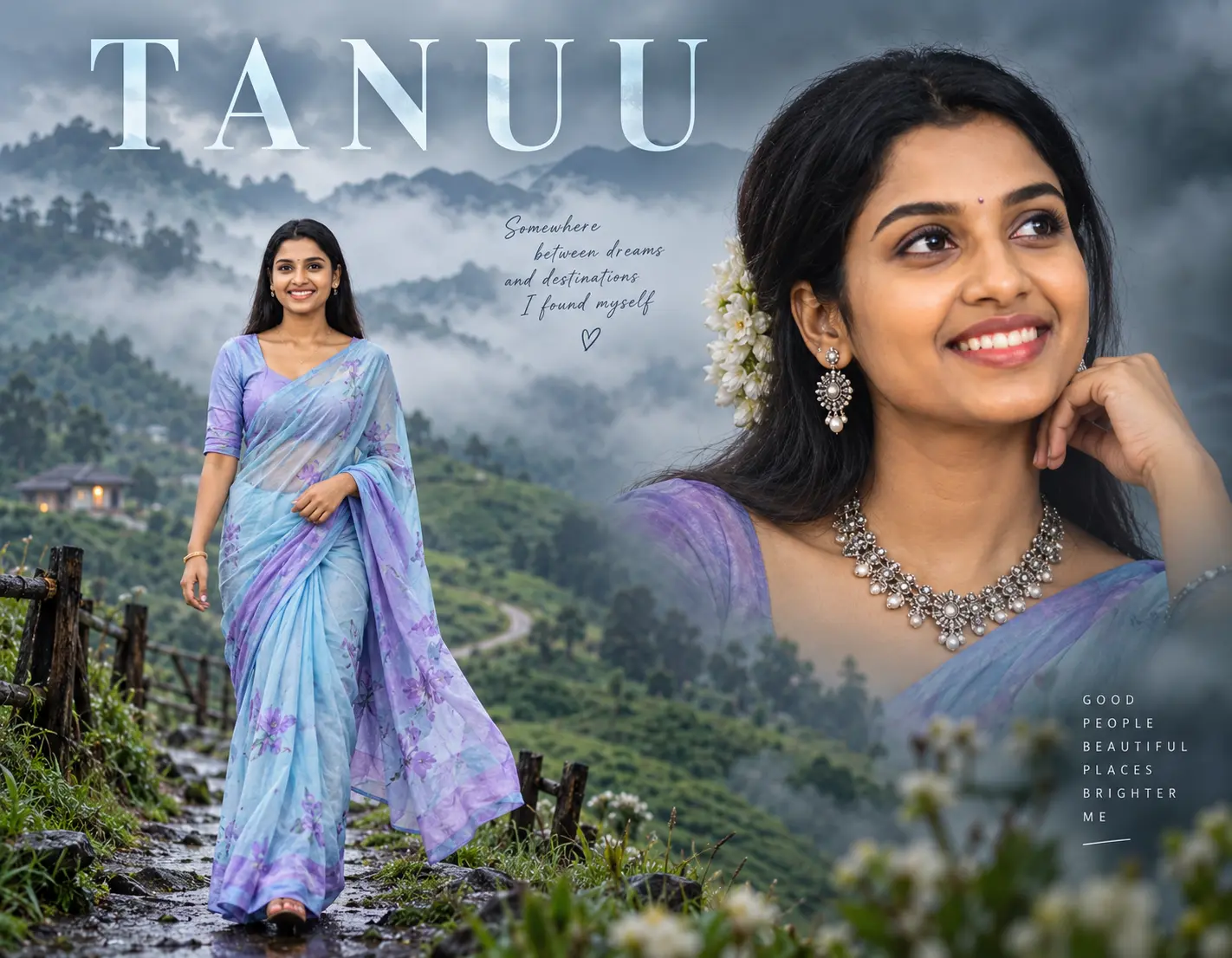
Cinematic Traveler Portrait AI Prompt – TANUU
Create a cinematic traveler-style photo with a dreamy and misty atmosphere, featuring a woman in a light blue and purple saree with dramatic close-up and full-body poses in the same frame.
The AI Image Prompt
Cinematic photography poster with traveler vibes and a moody, misty look. The composition features two poses in one frame: a large dramatic close-up portrait on the right side of the frame, showing a woman with dark hair styled with flowers, wearing a statement necklace and earrings, with her face turned slightly to the right under soft lighting. On the left side of the frame, there’s a large full-body pose of the same woman walking toward the camera on misty green hills, wearing a light blue and purple saree. The overall color palette is cool and muted, with a dreamy, ethereal atmosphere. Include the text ‘TANUU’ at the top.
How to Create This Image Step by Step
Follow the steps below to create a similar cinematic traveler image using the prompt. The exact result may vary depending on the AI image tool and model you use.
Choose an AI Image Tool
Open an AI image generation or image editing tool that supports detailed text prompts.
Copy the Prompt
Click the Copy Prompt button above to copy the complete cinematic traveler prompt.
Paste the Prompt
Paste the copied prompt into the prompt box of your selected AI image generation tool.
Add a Reference Image if Needed
If your AI tool supports image references, you can upload a suitable reference photo when you want to guide the subject’s appearance or composition.
Generate the Image
Start image generation and wait for the AI tool to create the result. The final composition can vary between different AI models.
Check the Two-Pose Composition
Look for the large close-up portrait on the right and the full-body pose walking through the misty green hills on the left.
Customize the Image
You can change the saree colors, background, lighting, hairstyle, accessories or text to create your own version.
Download Your Final Image
Once you are happy with the generated result, use the download or export option provided by your AI image tool.
What Makes This Prompt Work?
This prompt combines several visual elements to create a cinematic photography poster.
- Two different poses of the same subject in one frame
- Dramatic close-up portrait composition
- Full-body travel pose
- Misty green mountain landscape
- Light blue and purple saree
- Soft cinematic lighting
- Cool and muted color palette
- Dreamy and ethereal atmosphere
- Poster-style typography with the text “TANUU”
How to Customize This Prompt
You don’t have to use the prompt exactly as it is. Try changing individual elements to create a different visual style.
Tips for Better Results
- Use a clear reference image when the selected AI tool supports image references.
- Keep the main subject description detailed.
- Specify the desired lighting and mood.
- Experiment with portrait and landscape aspect ratios.
- Generate multiple variations if the first result does not match your expectations.
- Customize the prompt instead of repeatedly using exactly the same settings.
Important Note
AI image generation results can vary depending on the model, platform, version, settings, reference image and other inputs.
The preview shown on this page is an example of the intended visual concept. Your generated image may look different.