
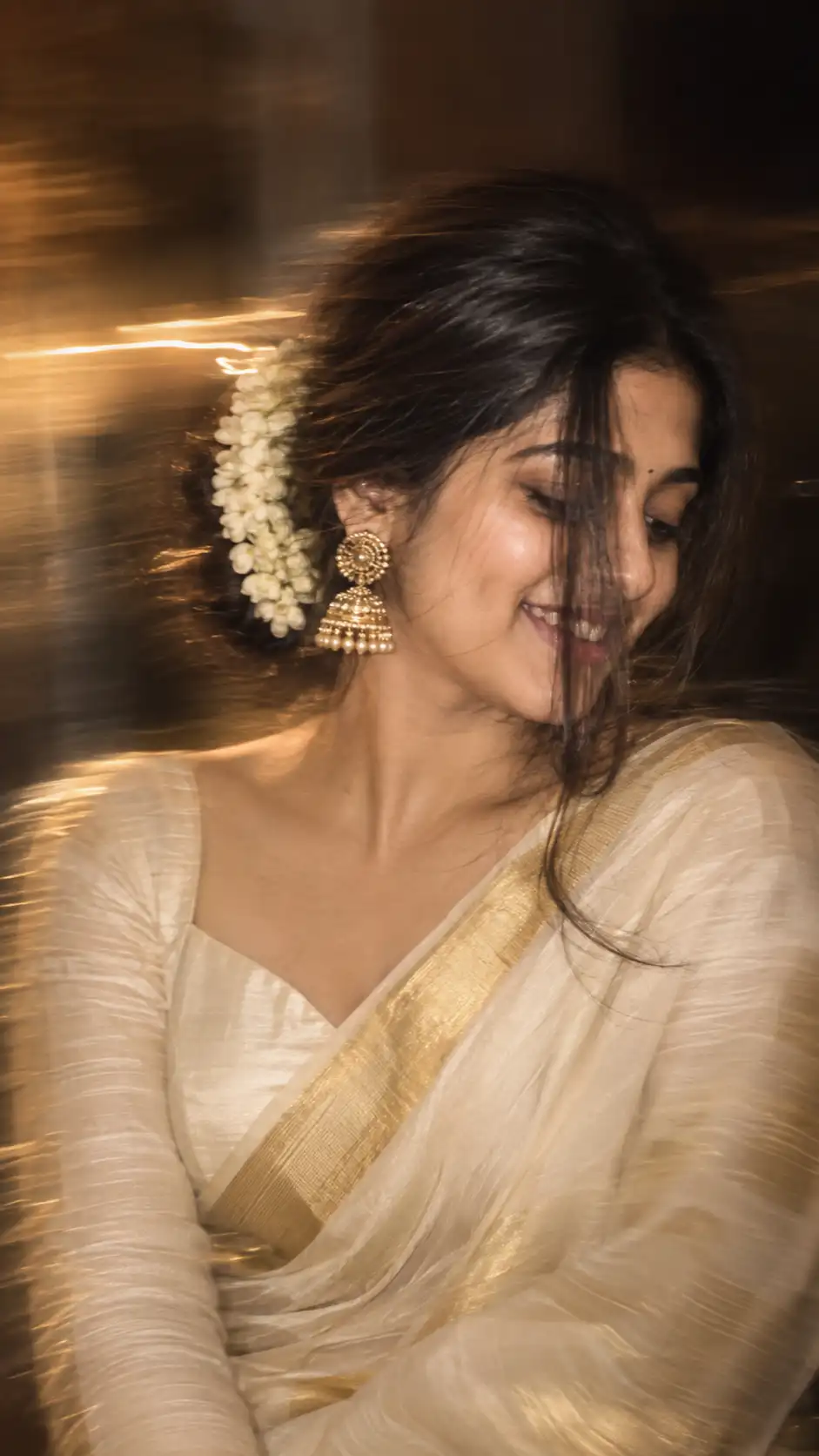
Onam Saree Artistic Motion Blur Portrait
क्या आप अपनी reference photo से एक ऐसा natural और artistic Onam saree portrait बनाना चाहते हैं जिसमें traditional Kerala-inspired styling के साथ beautiful motion blur effect भी हो? यह Onam Saree Artistic Motion Blur AI Photo Prompt इसी तरह की realistic portrait photography के लिए बनाया गया है।
इस prompt में traditional Onam saree, jasmine flowers से सजा हुआ loose braided low bun, statement gold earrings, natural makeup और smartphone या long-exposure photography जैसा intentional motion-blur effect शामिल है।
इसका सबसे खास हिस्सा है कि आप अपनी reference image का इस्तेमाल करके उसी व्यक्ति की recognizable facial identity को बनाए रखते हुए नया artistic portrait बनाने की कोशिश कर सकते हैं।
Onam Saree AI Photo Prompt क्या है?
यह एक detailed AI image prompt है जिसे traditional Onam saree look को modern editorial photography style के साथ combine करने के लिए तैयार किया गया है।
इसमें portrait को पूरी तरह static studio photo की तरह दिखाने के बजाय intentional artistic motion blur दिया गया है। इसका उद्देश्य ऐसा feel बनाना है जैसे photograph smartphone camera या long-exposure photography से naturally capture की गई हो।
Prompt में hair movement, saree texture और surrounding details में subtle motion रखा गया है, जबकि face को recognizable और relatively clear रखने की कोशिश की गई है।
इस AI Prompt में कौन-कौन से Elements हैं?
- Onam Saree: Traditional और elegant saree styling.
- Jasmine Flowers: Loose braided low bun के आसपास fresh jasmine flowers.
- Face-Framing Hair: एक लंबी loose hair strand जो चेहरे के एक हिस्से को naturally cover करती है.
- Gold Earrings: Large traditional statement earrings.
- Natural Makeup: Peach blush, subtle highlighter और dusty-rose matte lips.
- Artistic Motion Blur: Controlled long-exposure photography जैसा creative movement.
- 9:16 Composition: Mobile-friendly vertical portrait format.
- 4K Quality: High-detail photographic appearance के लिए quality instruction.
Reference Image के साथ Prompt कैसे Use करें?
Step 1: एक अच्छी Reference Photo चुनें
सबसे पहले वह photo चुनें जिसे आप reference के रूप में इस्तेमाल करना चाहते हैं। कोशिश करें कि चेहरे की important features clearly दिखाई दें।
यदि photo बहुत ज्यादा dark, blurry या heavily edited है, तो AI को facial details और overall appearance समझने में कठिनाई हो सकती है।
Step 2: इस Page से पूरा Prompt Copy करें
ऊपर दिए गए AI prompt card में मौजूद Copy Prompt button पर क्लिक करें। इससे पूरा prompt clipboard में copy हो जाएगा।
शुरुआत में prompt को manually छोटा करने की कोशिश न करें, क्योंकि इसमें identity, hairstyle, saree, lighting, motion blur, composition और negative instructions सभी अलग-अलग sections में दिए गए हैं।
ChatGPT में Onam Saree AI Photo कैसे बनाएं?
आप इस prompt को ChatGPT में इस्तेमाल कर सकते हैं।
OpenAI के अनुसार ChatGPT Images में existing image upload करके उसमें changes describe किए जा सकते हैं और image generation के दौरान desired aspect ratio भी specify किया जा सकता है।
🤖 ChatGPT में इस्तेमाल करने का तरीका
- ChatGPT खोलें
- अपनी reference photo upload करें।
- इस page से पूरा Onam Saree Motion Blur Prompt copy करें।
- Copied prompt को ChatGPT में paste करें।
- Image generation request submit करें।
- Result आने के बाद जरूरत के अनुसार छोटे बदलाव बताएं।
अगर पहली image में motion blur बहुत ज्यादा हो, तो आप refinement में लिख सकते हैं: “Keep the face sharper and reduce the motion blur around the facial area.”
Gemini में Onam Saree AI Portrait कैसे बनाएं?
यही prompt आप Google Gemini में भी try कर सकते हैं।
Google के official documentation के अनुसार Gemini Apps में image generate करने के साथ existing image upload करके edits भी किए जा सकते हैं। Prompt में visual style और detailed description देने की भी recommendation दी गई है।
✨ Gemini में इस्तेमाल करने का तरीका
- Google Gemini खोलें
- Image upload करने के लिए Add files option का इस्तेमाल करें।
- अपनी reference photo select करें।
- पूरा AI prompt paste करें।
- Prompt submit करके image generate करें।
- अगर result में बदलाव चाहिए तो उसी conversation में refinement prompt दें।
Gemini में reference image upload करके generated image को आगे refine भी किया जा सकता है। इसलिए पहली generation को final मानने के बजाय छोटे-छोटे instructions देकर desired look तक पहुंचने की कोशिश कर सकते हैं।
Natural Motion Blur Effect पाने के लिए क्या करें?
इस prompt का मुख्य creative element intentional motion blur है। लेकिन motion blur और completely blurry image में काफी अंतर होता है।
यहां उद्देश्य ऐसा photographic movement create करना है जिसमें image artistic लगे, लेकिन woman’s face और important facial characteristics पूरी तरह blur न हों।
अगर result बहुत ज्यादा blurred दिखाई दे तो आप AI को यह instruction दे सकते हैं:
Keep the face and facial features relatively sharp and recognizable. Reduce excessive blur around the face while maintaining subtle artistic motion in the hair, saree and surrounding areas.
Onam Saree Look को More Realistic कैसे बनाएं?
अगर saree artificial या overly generated दिखाई दे रही है, तो refinement prompt में fabric texture और natural draping पर ज्यादा focus करें।
Make the Onam saree fabric look naturally woven with realistic folds, subtle traditional detailing and authentic fabric texture. Keep the draping elegant and natural.
Jasmine Flowers और Hairstyle को Natural कैसे रखें?
इस portrait में jasmine flowers और braided low bun traditional appearance का important हिस्सा हैं। इसलिए flowers को बहुत ज्यादा oversized या artificial दिखने से बचाना चाहिए।
अगर flowers बहुत बड़े दिखाई दें, तो आप लिख सकते हैं:
Makeup को Natural कैसे रखें?
Prompt में soft peach blush, subtle highlighter, defined lashes और dusty-rose matte lips पहले से शामिल हैं। इसका उद्देश्य heavy glamour makeup की जगह soft editorial appearance बनाना है।
अगर AI skin को बहुत ज्यादा smooth कर देता है, तो refinement में लिखें:
9:16 Portrait किसके लिए Useful है?
Prompt में 9:16 vertical aspect ratio दिया गया है, इसलिए यह mobile-first content के लिए suitable composition है।
- Instagram Stories
- Instagram Reels
- YouTube Shorts
- WhatsApp Status
- Mobile wallpapers
- Vertical social media posts
Final image का exact aspect ratio और available generation options आपके इस्तेमाल किए जा रहे AI tool पर depend कर सकते हैं। ChatGPT में aspect ratio चुनने या prompt में ratio specify करने की सुविधा उपलब्ध है।
AI Image का Result पहली बार Perfect न आए तो?
यह normal है। Detailed AI prompts में भी कभी-कभी hairstyle, saree draping, jewelry, motion blur या facial expression expected result से अलग आ सकता है।
पूरी prompt को बदलने के बजाय एक समय में एक specific चीज सुधारना बेहतर तरीका हो सकता है।
उदाहरण:
- Reduce the motion blur.
- Keep the face more recognizable.
- Make the jasmine flowers more natural.
- Make the saree draping more realistic.
- Make the gold earrings slightly smaller.
- Keep the makeup subtle and natural.
- Maintain the 9:16 vertical composition.
इस Prompt का Best Result पाने के लिए 7 Practical Tips
- Clear reference photo इस्तेमाल करें।
- Face को बहुत ज्यादा crop न करें।
- Original prompt को पहले बिना बदलाव के try करें।
- Motion blur को subtle रखें।
- एक साथ बहुत सारे changes न मांगें।
- Saree और jasmine flowers के लिए realistic texture instructions बनाए रखें।
- Final image को publish करने से पहले अपनी reference image और generated image के usage rights/privacy considerations जरूर check करें।
HindiMePro पर और AI Photo Prompts
अगर आपको अलग-अलग themes और occasions के लिए AI photo prompts पसंद हैं, तो HindiMePro पर ये related guides भी पढ़ सकते हैं:
Frequently Asked Questions
क्या यह Onam saree prompt ChatGPT में इस्तेमाल किया जा सकता है?
हाँ। आप reference image upload करके पूरा prompt ChatGPT Images में इस्तेमाल कर सकते हैं। ChatGPT existing images को edit करने और image generation instructions देने की सुविधा देता है।
क्या यह prompt Gemini में भी काम करेगा?
हाँ। Gemini Apps में image upload करके उसे edit करने और detailed image-generation prompt इस्तेमाल करने की सुविधा उपलब्ध है।
क्या इसमें original face को preserve किया जा सकता है?
Prompt में identity-preservation instructions शामिल हैं। हालांकि किसी भी AI image generator में exact facial consistency की guarantee नहीं दी जा सकती। Reference image की quality और tool की interpretation से result बदल सकता है।
Motion blur इतना ज्यादा क्यों आ सकता है?
क्योंकि prompt में intentional artistic motion blur दिया गया है। अगर result जरूरत से ज्यादा blurred है, तो refinement prompt देकर face को sharper और surrounding motion को subtler करने के लिए कहें।
क्या यह prompt 9:16 image बना सकता है?
Prompt में 9:16 vertical composition explicitly दी गई है। इस्तेमाल किए जा रहे AI tool में उपलब्ध aspect-ratio settings के अनुसार final output अलग हो सकता है।
क्या Onam saree का रंग बदला जा सकता है?
हाँ। आप prompt में saree के desired color और border detailing को specify कर सकते हैं, जबकि बाकी hairstyle, pose और photography style को unchanged रखने के लिए कह सकते हैं।
✨ अपना Onam Saree Artistic Portrait बनाकर देखें
अपनी clear reference image तैयार करें, ऊपर दिया गया prompt copy करें और इसे ChatGPT या Gemini में try करें। पहली generation के बाद छोटे refinement instructions देकर motion blur, saree, hairstyle और lighting को अपने पसंद के अनुसार adjust कर सकते हैं।